


Managing diabetes often comes down to noticing patterns, not just collecting isolated readings. That is where OneTouch Reveal® aims to help. Developed by LifeScan, Inc., this free medical app turns compatible OneTouch blood glucose readings into a more organized view, giving me a clearer way to look back at results and discuss them with a healthcare professional. I found it most useful when I treated it as a regular record-keeping companion rather than a replacement for testing, medical advice, or personal judgment.
The app has a 4.4 average from around 33 thousand ratings, and its reach is reflected in more than a million installs. It is rated for Everyone, so its presentation is approachable, but the subject itself is serious: a neat screen does not make a glucose reading automatically meaningful. The value comes from using the information consistently, checking the context around readings, and taking the resulting questions to the right person.
How I built a dependable everyday workflow
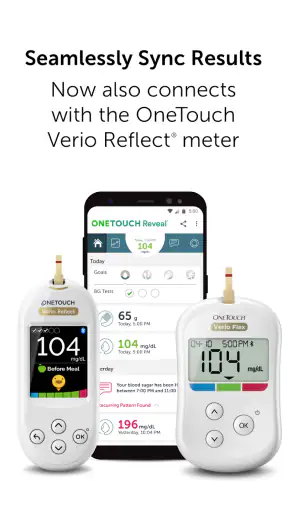
My first recommendation is to establish a simple baseline before exploring every option. I would begin by connecting a supported OneTouch meter if the setup allows it, then checking that readings appear correctly and in the expected order. If I entered information manually, I would be especially careful with dates, times, and notes. A small entry mistake can make an otherwise useful pattern look confusing later.
The most practical routine is to open the app at a predictable moment instead of waiting until a large amount of information has accumulated. For some people that may be after a testing routine; for others it may be during an evening review. The important part is consistency. A short review makes it easier to notice whether a result was connected with a meal, exercise, illness, stress, or a change in routine.
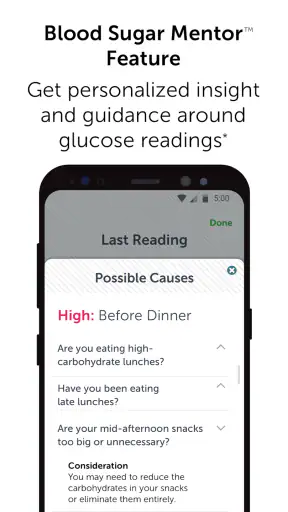
I also found that the app works better when I think in terms of questions. Rather than staring at a graph and asking whether it looks “good,” I would ask whether readings tend to change around a particular meal, whether a different schedule produces a different pattern, or whether an unusual result had a clear explanation. Those questions make the record more useful during a conversation with a clinician.
A realistic example is a busy workday. Someone might test before breakfast, rush through lunch, and see a result that seems unusual later in the day. The app cannot explain the cause by itself, but a note about a skipped meal, a long walk, or an unexpectedly stressful meeting can preserve the context. When several similar situations appear, the record becomes more informative than a number viewed alone.
The strongest habit is to record context while it is still fresh. Even a brief note can prevent the common problem of looking back at a result and no longer remembering what happened around it. I would not try to write an essay for every reading; a few meaningful words are easier to maintain and more likely to be useful.
OneTouch Reveal is also better suited to people who already use the OneTouch ecosystem than to someone looking for a completely device-independent diary. Its central appeal is the relationship between the app and compatible glucose readings. If you use another meter and do not want to change your equipment, a general diabetes log may fit your existing routine more naturally.
What I would check before relying on it
Compatibility deserves attention before making the app part of a daily plan. The current version is 5.17.1 and requires operating system version 10 or later, so an older phone may be an immediate obstacle. I would check the phone’s software version and confirm that the particular OneTouch meter is supported before assuming setup will be effortless.
Pairing is not the same as clinical interpretation. Even when readings transfer smoothly, I would still look at the meter and the app as tools for organizing information. If a result seems inconsistent with how I feel or with another reading, I would follow the testing guidance for the meter and seek appropriate medical advice rather than treating the app’s display as an answer.
The app’s free price makes it easy to try, but “free” does not remove the practical cost of attention. You still need to keep the meter ready, test according to your care plan, and review the record. Someone expecting the app to automatically manage diabetes without regular input will probably be disappointed.
Settings that deserve a deliberate review
I would not rush through the initial settings. The first thing to inspect is the profile and target-related information available in the app, making sure it reflects the guidance given by a healthcare professional. Targets are personal, and copying a generic expectation from someone else’s routine can create unnecessary worry or false reassurance.
Notifications are another area where restraint helps. Alerts can be useful if they support an established routine, but too many reminders quickly become background noise. I prefer notifications that encourage a specific action I genuinely intend to take. If a reminder repeatedly arrives at a bad time, changing it is more sensible than ignoring every alert.
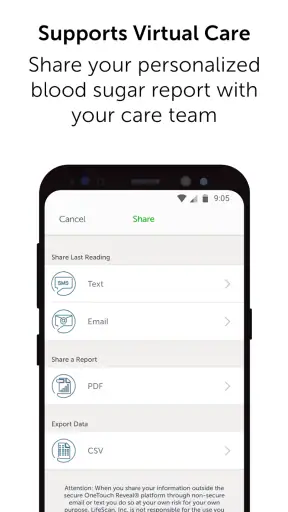
Privacy and phone access should also be considered in practical terms. A diabetes log can reveal sensitive health information, so I would review the app’s permissions and the phone’s own security settings. I would also avoid assuming that an app record is the only copy worth keeping. For an important appointment, I would make sure the information is available in a form I can actually show or discuss if the phone, connection, or pairing process becomes inconvenient.
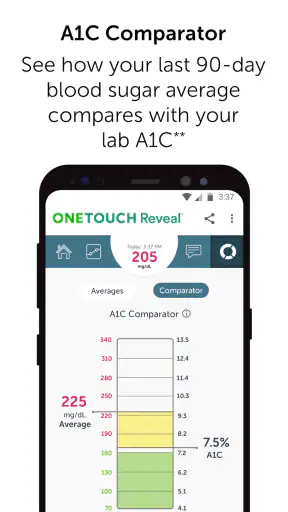
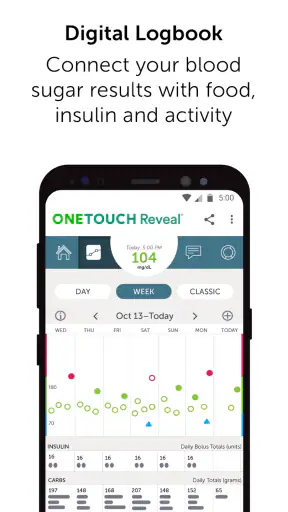
Another useful check is the display itself. If the app offers different ways to view readings, I would use the one that answers my current question instead of always opening the most attractive chart. A trend view may help with repeated changes, while a chronological record may be better when checking what happened on one particular day. The best screen is the one that reduces confusion.
Because the app is a medical tool, I would avoid changing treatment decisions simply because a visual pattern looks persuasive. A graph can highlight something worth asking about, but it cannot account for every factor in a person’s health. This distinction is easy to forget when an app presents information neatly.
Faster patterns for people who use it regularly
After the initial setup, the biggest speed improvement comes from reducing unnecessary handling. If readings can be transferred from a compatible meter, that is preferable to repeatedly copying numbers. It reduces transcription work and leaves more time for reviewing context. If manual entry is necessary, I would make it part of the same moment as the test rather than postponing several entries until the end of the day.
I would also create a repeatable review sequence: check recent readings, look for a repeated pattern, add context to the unusual entries, and write down questions for the next healthcare conversation. This sequence is faster than scrolling without a purpose, and it prevents the review from turning into a stressful search for a perfect result.
One useful trade-off is deciding when not to add detail. Notes are valuable when they explain a meaningful difference, such as a changed meal, unusual activity, or a disrupted schedule. Recording the same obvious phrase every time creates clutter and makes the important notes harder to find. The goal is not the longest diary; it is the clearest one.
Experienced users may also separate routine checking from appointment preparation. Daily use can stay brief, while a longer review before a clinical visit can focus on recurring patterns and unresolved questions. That approach makes the app less demanding without abandoning the information that matters.
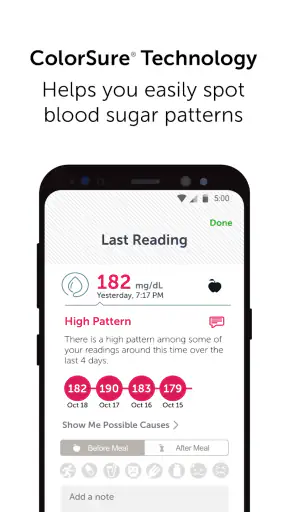
I would be cautious about treating a single high or low result as a trend. Looking for repetition across related situations is more useful than reacting to one isolated point. This is especially important when the surrounding circumstances were unusual. The app can help place readings next to one another, but the user still has to decide whether the comparison is fair.
Another efficient habit is to keep the app and meter routine stable for a while instead of constantly changing tools. Frequent switching can make it difficult to tell whether a change comes from the person’s routine, the device, the timing, or the way information was entered. OneTouch Reveal is most helpful when it supports a consistent process rather than becoming another variable.
Where the app reaches its limits
The main limitation is that organization is not the same as diagnosis. OneTouch Reveal can make readings easier to review, but it cannot explain every fluctuation or replace a care plan. Users who want an app to prescribe adjustments, interpret every result, or provide a complete picture of their health may need a different kind of service, along with professional support.
It may also be the wrong choice for someone who does not use compatible OneTouch equipment. A general-purpose log could be more convenient if your readings come from several devices or if you want one place for information beyond glucose tracking. OneTouch Reveal’s focused design is a strength for its intended workflow, but that focus can feel restrictive outside it.
The app is not ideal for people who dislike digital record-keeping. Even with connected readings, useful review depends on paying attention to the record and adding enough context to understand it. Someone who wants a completely passive experience may find that the app still asks for more involvement than expected.
There is also a risk of over-monitoring. Seeing a chart can encourage repeated checking without a clear reason, especially for users who are anxious about every variation. I think the healthiest approach is to follow the testing schedule and advice already established with a healthcare professional, using the app to organize that routine rather than intensify it.
Phone and software requirements can create friction as well. The app depends on a modern enough operating system, and device pairing can be less convenient than simply writing a result down. If your phone is shared, unreliable, or often unavailable, a paper record or another accessible method may be a better backup. The best diabetes tool is the one you can use consistently when you need it.
Finally, visual clarity should not be confused with accuracy beyond the underlying reading. The app can display information in a more approachable way, but it does not make testing technique irrelevant. Correct meter use, appropriate timing, and honest notes still matter. When those foundations are weak, a polished history can give a misleading sense of confidence.
My verdict after settling into the routine
I see OneTouch Reveal as a focused companion for people who use compatible OneTouch meters and want a cleaner way to review glucose information. It is free, accessible to an Everyone audience, and made by LifeScan, Inc., which gives it a clear place in the medical app category. Its broad adoption and around 8.1 thousand written reviews suggest that many users find the basic concept worthwhile, but the real test is whether it fits your own equipment and habits.
I would recommend it to someone who wants to move beyond scattered readings, prepare better questions for appointments, and build a repeatable review habit. I would especially recommend it to a person willing to add brief context rather than relying only on numbers. That small effort is what turns the app from a digital list into a more useful record.
I would skip it if you do not use OneTouch equipment, need a broad health-management platform, or strongly prefer a paper-based routine. I would also avoid making it the center of decision-making if you are looking for automated treatment guidance. In those situations, a different logging method or a clinician-supported system may be more appropriate.
My final advice is to start modestly. Connect the compatible meter if possible, verify the first readings, review the settings, and use the same short routine for several days. Do not chase every visual change. Look for patterns that relate to real life, keep notes concise, and bring meaningful questions to a healthcare professional. Used that way, OneTouch Reveal® does not pretend to solve diabetes management; it gives the information you already collect a more practical place to work.


